 Literal Word BibleTagger
Automatically turn Bible references on your website into links to Literal Word. Add one line of HTML and references like John 3:16 or Rom 5:8 become links to the passage, with the verse text shown in a popup on hover. It is free, lightweight, and runs entirely in the visitor's browser.
No ads in the hover.
No ads in the page it opens.
Just clean Scripture.
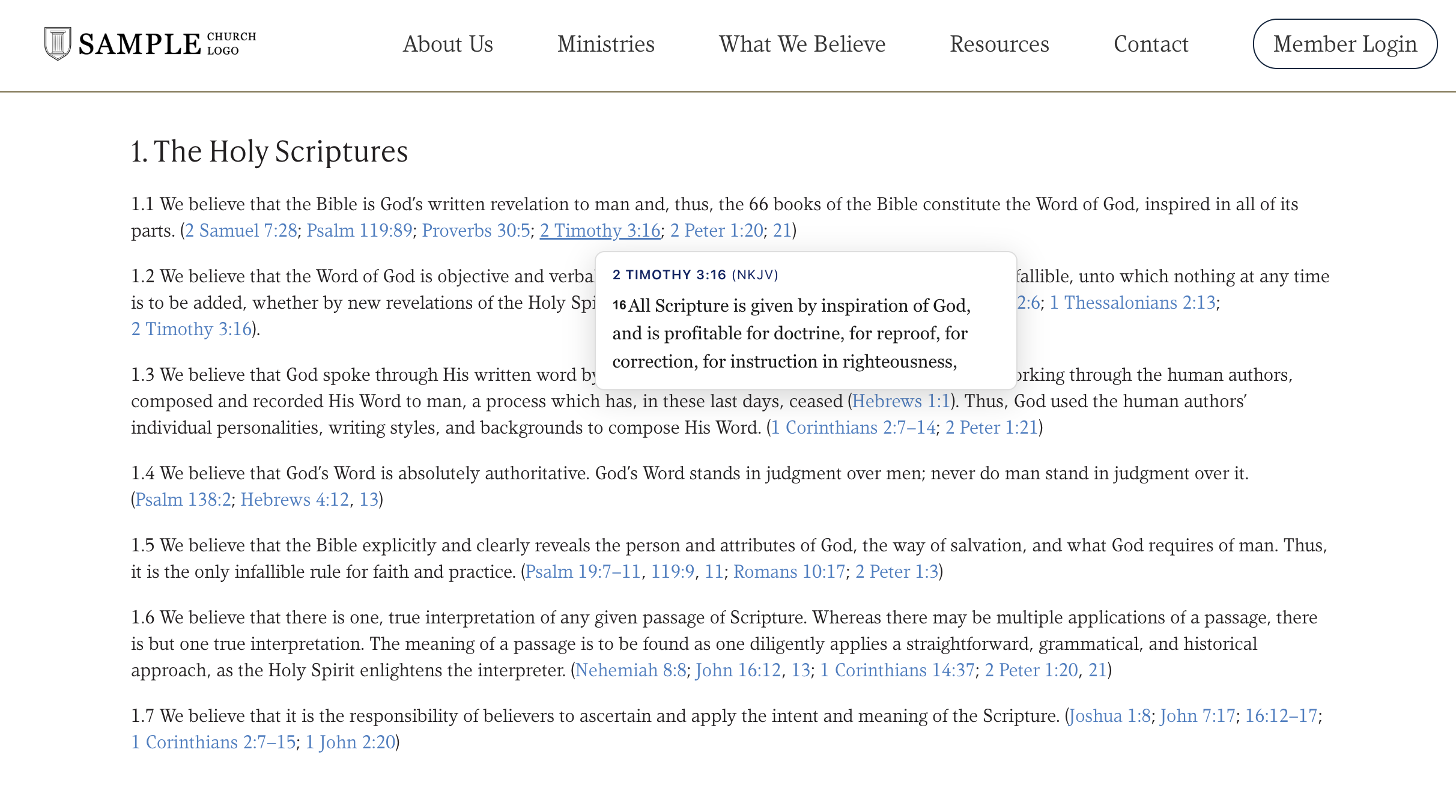
The Literal Word BibleTagger is also available as a WordPress plugin.
How it works
- Pick your preferred Bible translation and options below.
- Copy the generated script tag.
- Paste it into your page's HTML. That's it. References on the page are linked on load.
Options
On hover (or tap) a small card shows the passage, up to 5 verses, with a link to read more. Hover a reference below to try it.
Color scheme of the hover card. Defaults to light on every site; choose Dark to force it, or System to follow each visitor's OS setting.
Added to every generated link so you can style it. All links also get the lw-tagged class.
Comma-separated CSS selectors; only references inside matching elements are tagged. Leave empty to scan the whole page.
Comma-separated CSS selectors; references inside matching elements are left untouched.
Your embed code
<script src="https://literalword.com/bible-tagger.js" data-version="NASB"></script>Paste it anywhere in your page's HTML. By embedding BibleTagger you agree to the Terms of Use.
Live preview
For God so loved the world (John 3:16). Compare Gen 1:1 with Jn 1:1, and read Romans 5:8-10, 12 alongside Ps 23. See also 1 Cor 13:4, 7; Acts 2:38ff; and Mt 5:3f. The whole of Hebrews 11 commends the faithful.
Customize the popup with your own CSS
The hover popup renders in a shadow root, so your site's CSS can style the links but not the card's inside. To restyle the card, set these CSS variables anywhere on your page (e.g. on :root) — they pierce the shadow boundary, and your values win in both light and dark themes (on WordPress, paste them under Appearance → Customize → Additional CSS):
:root {
  --lw-popup-font-family: "Trebuchet MS", sans-serif;
  --lw-popup-border-radius: 14px;
  --lw-reference-color: #0a7d3c;     /* reference header */
  --lw-verse-number-color: #c0392b;  /* verse numbers */
  --lw-more-color: #0a7d3c;          /* "Read full passage" link */
}
Variables: --lw-popup-font-family, --lw-popup-font-size, --lw-popup-line-height, --lw-popup-bg, --lw-popup-color, --lw-popup-border-color, --lw-popup-border-radius, --lw-popup-padding, --lw-popup-shadow, --lw-popup-max-width, --lw-reference-color, --lw-reference-font-family, --lw-reference-font-size, --lw-verse-number-color, --lw-verse-number-font-family, --lw-more-color.
For anything not covered by a variable, target the parts directly: .lw-tagger-host::part(reference) { text-transform: none; } — parts are popup, reference, verse, verse-number, and more-link. The links themselves are plain page elements: use the lw-tagged class (or your data-class).
BibleTagger runs in your visitor's browser. To show a verse on hover it sends the detected reference and translation (e.g. John 3:16, NKJV) to literalword.com, but not the surrounding page text. As with any web request, ordinary connection metadata is visible to our hosting provider. References that don't resolve to a real chapter are left as plain text. Questions? contact@literalword.com.